Ymir镜像数据集格式#
数据集整体格式#
/in/env.yaml#
ymir平台提供的数据集信息存储在镜像文件 /in/env.yaml 中。
input:
  annotations_dir: /in/annotations  # 标注文件存储目录
  assets_dir: /in/assets  # 图像文件存储目录
  candidate_index_file: /in/candidate-index.tsv  # 推理或挖掘任务中的数据集索引文件
  config_file: /in/config.yaml  # 超参数文件
  models_dir: /in/models  # 预训练模型文件存储目录
  root_dir: /in  # 输入信息根目录
  training_index_file: /in/train-index.tsv  # 训练任务中的训练数据集索引文件
  val_index_file: /in/val-index.tsv  # 训练任务中的验证数据集索引文件
output:
  infer_result_file: /out/infer-result.json  # 推理任务结果文件
  mining_result_file: /out/result.tsv  # 挖掘任务结果文件
  models_dir: /out/models  # 训练任务权重文件输出目录
  monitor_file: /out/monitor.txt  # 进度记录文件
  root_dir: /out  # 输出信息根目录
  tensorboard_dir: /out/tensorboard  # 训练任务中tensorboard日志目录
  training_result_file: /out/models/result.yaml  # 训练任务的结果文件
run_infer: false  # 是否执行推理任务
run_mining: true  # 是否执行挖掘任务
run_training: false  # 是否执行训练任务
protocol_version: 1.0.0  # ymir平台镜像接口版本
task_id: t00000020000029d077c1662111056  # 任务id
注意
/in/env.yaml 中的所有路径均为绝对路径
训练任务#
ymir平台导出的数据集格式,其中图片格式固定为 'raw', 而标注格式可为 ["ark", "voc", "det-ark", "det-voc", "seg-coco"] 中的某一个, 用户可以通过超参数 export_format 修改ymir平台为训练任务提供的数据集格式。
- 训练与验证数据集信息分别存储在索引文件
/in/train-index.tsv与/in/val-index.tsv中, 其中每行的格式为<图像文件绝对路径>\t<标注文件绝对路径>
<图像文件1绝对路径>  <标注文件1绝对路径>
<图像文件2绝对路径>  <标注文件2绝对路径>
<图像文件3绝对路径>  <标注文件3绝对路径>
推理任务与挖掘任务#
-
推理任务与挖掘任务的数据集格式相同
-
推理或挖掘数据集信息存储在索引文件
/in/candidate-index.tsv中,其中每行的格式为<图像文件绝对路径>
<图像文件1绝对路径>
<图像文件2绝对路径>
<图像文件3绝对路径>
det-ark:raw#
也可写为 ark:raw, 为目标检测格式
- export_format = det-ark:raw 时的训练/验证集索引文件
/in/assets/02/1c5c432085dc136f6920f901792d357d4266df02.jpg      /in/annotations/02/1c5c432085dc136f6920f901792d357d4266df02.txt
/in/assets/95/e47ac9932cdf6fb08681f6b0007cbdeefdf49c95.jpg      /in/annotations/95/e47ac9932cdf6fb08681f6b0007cbdeefdf49c95.txt
/in/assets/56/56f3af57d381154d377ad92a99b53e4d12de6456.jpg      /in/annotations/56/56f3af57d381154d377ad92a99b53e4d12de6456.txt
这个索引文件采用文本文件格式,每行包含一个图像的绝对路径及对应标注的绝对路径,以制表符 \t进行分隔。
-
标注txt文件每行的格式为
class_id, xmin, ymin, xmax, ymax, ann_quality, bbox_angle, 以英文逗号,进行分隔。-
class_id: 表示标注框所属类别的整数,从0开始计数 -
xmin, ymin, xmax, ymax: 表示标注框左上角和右下角的整数坐标值,以像素为单位。 -
ann_quality:表示标注质量的浮点数,默认为-1.0 -
bbox_angle: 表示标注框旋转角度的浮点数,以弧度RAD为单位,默认为0.0
-
0, 242, 61, 424, 249, -1.0, 0.0
1, 211, 147, 325, 255, -1.0, 0.0
1, 122, 7, 372, 375, -1.0, 0.0
det-voc:raw#
也可写为 voc:raw, 为目标检测格式
- export_format = det-ark:raw 时的训练/验证集索引文件
/in/assets/02/1c5c432085dc136f6920f901792d357d4266df02.jpg      /in/annotations/02/1c5c432085dc136f6920f901792d357d4266df02.xml
/in/assets/95/e47ac9932cdf6fb08681f6b0007cbdeefdf49c95.jpg      /in/annotations/95/e47ac9932cdf6fb08681f6b0007cbdeefdf49c95.xml
/in/assets/56/56f3af57d381154d377ad92a99b53e4d12de6456.jpg      /in/annotations/56/56f3af57d381154d377ad92a99b53e4d12de6456.xml
- 示例xml文件
<annotation>
    <folder>VOC2012</folder>
    <filename>2008_000026.jpg</filename>
    <source>
        <database>The VOC2008 Database</database>
        <annotation>PASCAL VOC2008</annotation>
        <image>flickr</image>
    </source>
    <size>
        <width>500</width>
        <height>375</height>
        <depth>3</depth>
    </size>
    <segmented>0</segmented>
    <object>
        <name>person</name>
        <pose>Frontal</pose>
        <truncated>1</truncated>
        <occluded>1</occluded>
        <bndbox>
            <xmin>122</xmin>
            <ymin>7</ymin>
            <xmax>372</xmax>
            <ymax>375</ymax>
        </bndbox>
        <difficult>0</difficult>
    </object>
    <object>
        <name>dog</name>
        <pose>Unspecified</pose>
        <truncated>0</truncated>
        <occluded>1</occluded>
        <bndbox>
            <xmin>211</xmin>
            <ymin>147</ymin>
            <xmax>325</xmax>
            <ymax>255</ymax>
        </bndbox>
        <difficult>0</difficult>
    </object>
</annotation>
seg-coco:raw#
语义与实例分割的标注格式, 参考coco数据集给出的格式
export_format = seg-coco:raw时的训练/验证集索引文件
注意
训练集与验证集共享一个标注文件,需要根据索引文件进行数据集划分
注意
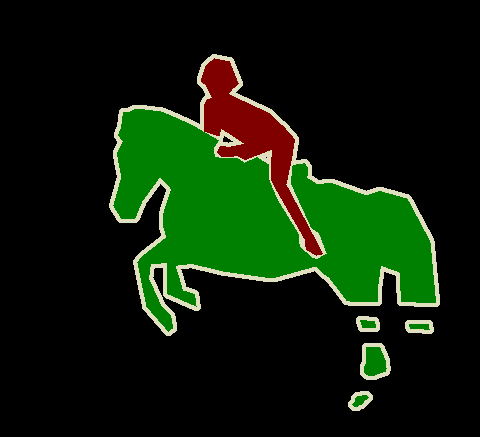
语义与实例分割标注中不包含背景类,即只提供项目标签的标注mask。 如下图所示,annotations中可能只编码人和马的区域。 用户可以通过超参数控制训练镜像是否忽略背景区域。
/in/assets/02/1c5c432085dc136f6920f901792d357d4266df02.jpg      /in/annotations/coco-annotations.json
/in/assets/95/e47ac9932cdf6fb08681f6b0007cbdeefdf49c95.jpg      /in/annotations/coco-annotations.json
/in/assets/56/56f3af57d381154d377ad92a99b53e4d12de6456.jpg      /in/annotations/coco-annotations.json
- 示例json文件
标注mask采用 rle 编码。
{
    "images": [
        {
            "file_name": "fake1.jpg",
            "height": 800,
            "width": 800,
            "id": 0
        },
        {
            "file_name": "fake2.jpg",
            "height": 800,
            "width": 800,
            "id": 1
        },
        {
            "file_name": "fake3.jpg",
            "height": 800,
            "width": 800,
            "id": 2
        }
    ],
    "annotations": [
        {
            "bbox": [
                0,
                0,
                20,
                20
            ],
            "segmentation": {"counts": ''},
            "area": 400.00,
            "score": 1.0,
            "category_id": 1,
            "id": 1,
            "image_id": 0
        },
        {
            "bbox": [
                0,
                0,
                20,
                20
            ],
            "segmentation": {"counts": ''},
            "area": 400.00,
            "score": 1.0,
            "category_id": 2,
            "id": 2,
            "image_id": 0
        },
        {
            "bbox": [
                0,
                0,
                20,
                20
            ],
            "segmentation": {"counts": ''},
            "area": 400.00,
            "score": 1.0,
            "category_id": 1,
            "id": 3,
            "image_id": 1
        }
    ],
    "categories": [
        {
            "id": 1,
            "name": "bus",
            "supercategory": "none"
        },
        {
            "id": 2,
            "name": "car",
            "supercategory": "none"
        }
    ],
    "licenses": [],
    "info": null
}